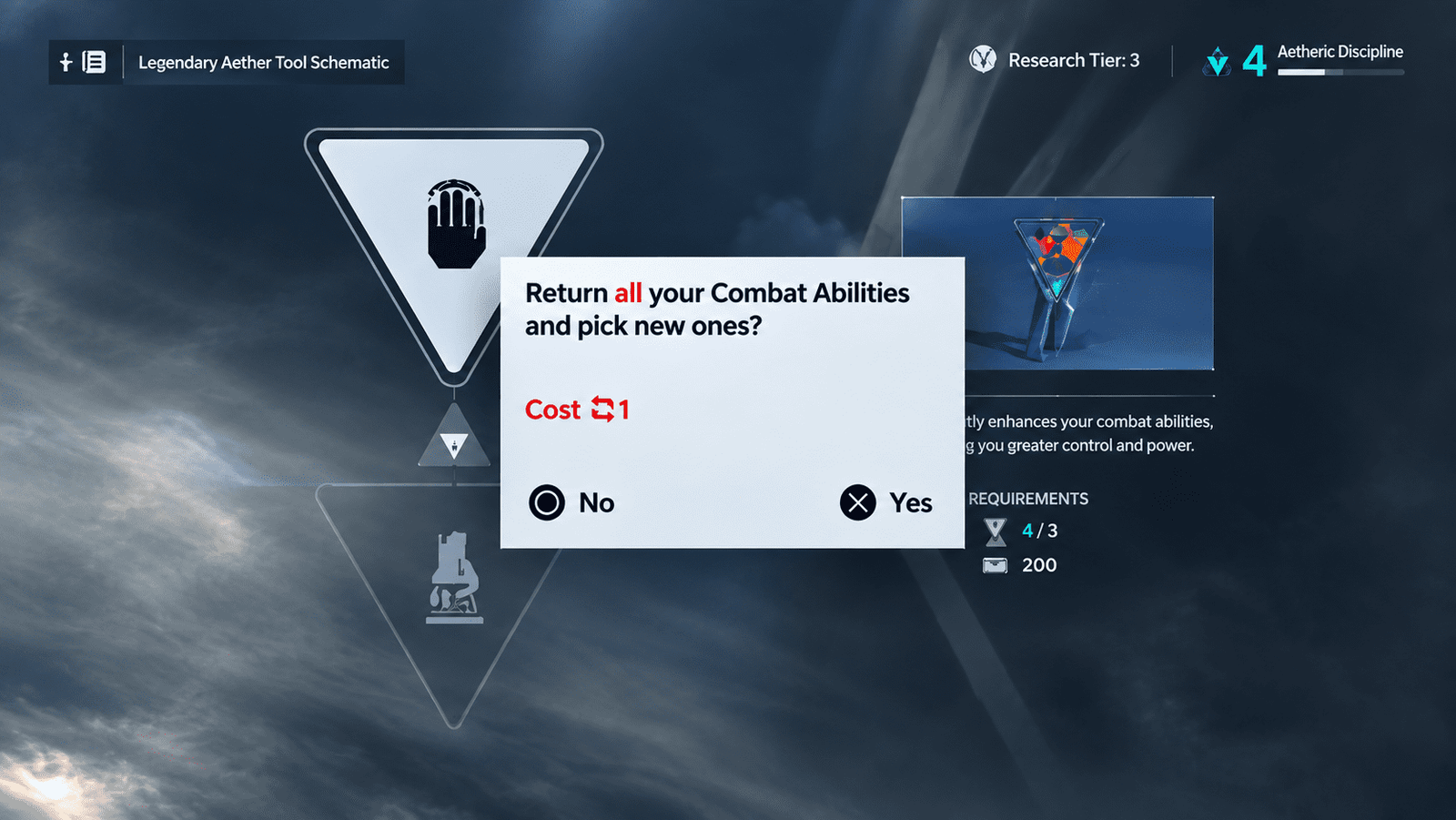

Made a bad call on Dylan’s build in Control Resonant? You’re not stuck with it forever — but fixing it isn’t as simple as opening a menu and hitting reset. Here’s everything you need to know about Reset Items and how the game’s respec system actually works.
What Are Reset Items?
Reset Items are the consumable that lets you respec Dylan in Control Resonant. The catch: they’re rare, and they’re expensive. Don’t expect to casually reset your build every hour — this is a system designed for occasional course-correction, not constant experimentation.
How To Get Reset Items
There are two ways to get your hands on a Reset Item, though one is far more reliable than the other.
Buy them from Vendors. This is the easiest and most consistent method. Vendors scattered across the Control Resonant map sell Reset Items for 5,000 Source each. Every Vendor only stocks a limited number, and how many they have depends on that Vendor’s level — so don’t expect to buy in bulk from a single location. Still, between all the Vendors across the map, most players will find more than enough for a typical playthrough.

Find them from missions. Reset Items occasionally drop as rewards for completing certain missions or side quests, but this is inconsistent and not something you can plan around. Treat it as a bonus, not a strategy.

If you’re serious about respeccing, saving up 5,000 Source and tracking down a Vendor is by far your best bet.
How To Actually Respec
Once you’ve got a Reset Item in hand, head to the Gap — the game’s central hub zone. This is where all respec options live.
From there, go to the relevant menu and hold down the button shown at the top of the screen to spend your Reset Item. Doing this lets you fully reset one of the following:
- Your chosen Abilities and powers
- Your weapon and Aberrant Form upgrades
- Your Talents / skill tree
- Your Combo Finishers
Note that each Reset Item only resets one of these categories at a time — you can’t wipe your entire build with a single item. If you want to overhaul multiple systems, you’ll need to save up multiple Reset Items.
Should You Actually Spend One?
Here’s the practical advice: treat Reset Items as a last resort, not a first option.
If you’re unhappy with your Weapons or Talents, it’s usually smarter to just grind out the materials or Talent Points needed to buy the upgrades you actually want, rather than burning a rare Reset Item. Both of those systems are things you can rebuild through normal progression without spending anything scarce.
Where a Reset Item genuinely earns its keep is with your Abilities and powers. Unlike weapons or talents, some ability choices lock out other options entirely, meaning you can paint yourself into a corner early on without realizing it. If you picked an ability path that’s now excluding something you actually want, a Reset Item is the only way back — and in that case, it’s worth the cost.
Quick Summary
- Reset Items respec Dylan’s build in Control Resonant
- Buy them from Vendors for 5,000 Source each (limited stock per Vendor)
- Rarely, they drop from mission/quest completion
- Use them at the Gap hub zone by holding the menu button shown on screen
- Each item resets one category only: Abilities, Weapons/Aberrant Form, Talents, or Combo Finishers
- Save Reset Items for Ability respecs — Weapons and Talents can usually be rebuilt through normal grinding
Where To Find Vendors
Vendors aren’t concentrated in one area — they’re spread across the map in Control Resonant, usually near hub points and safe zones you’ll naturally pass through during missions. Since each one only carries a couple of Reset Items depending on its Vendor Level, it’s worth checking every Vendor you come across rather than relying on just one or two. If you’re planning ahead for a respec, keep a mental note of which Vendors you’ve already bought from so you know where to return once you’ve saved up more Source.
Saving Up 5,000 Source
Source is the currency you’ll be spending here, and 5,000 per Reset Item adds up fast if you’re trying to respec more than one system. A few habits help:
- Prioritize completing side content and mission objectives, since Source often comes as a completion reward
- Avoid impulse-buying other Vendor items if a respec is your priority — decide what matters more before you spend
- If you’re eyeing an Ability respec specifically, start saving early rather than waiting until you’re already unhappy with your build, since Vendor stock is limited and you don’t want to be caught short
Common Questions
Can I respec more than one category with a single Reset Item? No. Each Reset Item only resets one category — Abilities, Weapons/Aberrant Form, Talents, or Combo Finishers. To overhaul multiple systems, you’ll need to buy or find multiple Reset Items.
Is there a way to get Reset Items for free? Not reliably. Mission and quest completions occasionally hand one out, but it’s random and not something you can farm on purpose. Vendor purchases remain the only consistent method.
What happens to my progress when I respec? Respeccing resets your choices in that specific category, letting you reassign points or pick different options from scratch. It doesn’t erase your overall character progress or level — it just gives you a clean slate for that one system.
Should new players worry about needing a respec? Not immediately. Since Weapons and Talents can be rebuilt through normal grinding anyway, the main risk is locking yourself out of an Ability path early on. If you’re a completionist who likes experimenting, it’s worth being a little cautious with your first few Ability choices rather than assuming you can freely undo them later.