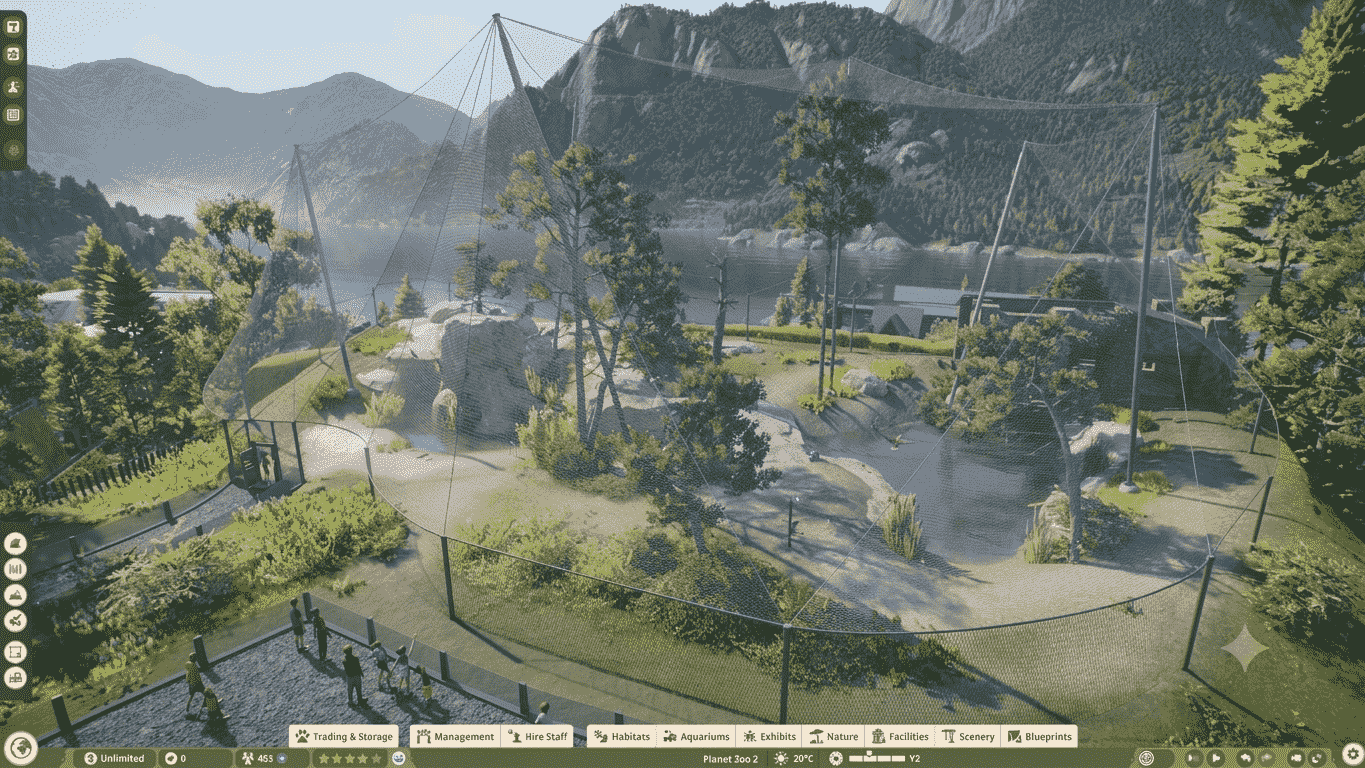

Planet Zoo 2 launched on October 13, 2026 on PS5, Xbox Series X|S and PC, with three ways to play: Career, Sandbox and Franchise. A new Planet Hub menu ties them together. This page compares the modes side by side, covering what each one asks of you, whether it needs an internet connection and how to start it.
Modes At A Glance
| Career | Sandbox | Franchise | |
|---|---|---|---|
| Style | Story-led, single-player | Creative, no restrictions | Connected network with other players |
| Your role | New Conservation Coordinator at the Fauna and Ecosystems Network (FEN) | Zoo builder | Franchise owner |
| Animals and regions | Unlocked through progress | All available from the start | Unlocked by accreditation tier |
| Difficulty | Rises as objectives introduce mechanics one at a time | You choose simulation and challenge level | Reputation and operational goals |
| Online required | No | No | Yes (per AllThings.how) |
| Trading | Move animals between your own zoos and Reserves | Not mentioned | Trade animals with other players |
| Sharing | Not mentioned | Frontier Workshop | Community Challenges |
| Setup | Start a new career, finish Chapter 1 | Adjust settings, create a zoo | Sign in to a Frontier account, name your franchise and banner |
Career Mode
| Detail | Info |
|---|---|
| Premise | You join FEN as a new Conservation Coordinator and travel the world |
| Locations | Wildlife Reserves, distinctive zoos and scenarios |
| Story | A cast of characters moves the plot forward |
| Pacing | Each objective introduces one mechanic and gets harder |
| What you manage | Animal welfare, needs, breeding and conservation |
| Research | Applies across your whole network |
| Animal movement | Between your zoos and out to Wildlife Reserves |
| Endgame | Releasing animals into Wildlife Reserves (Shacknews) |
| After the story | Careers can continue in Sandbox |
| Online | Not required |
How To Start Career
- Open Career from the main menu.
- Launch a new career.
- Complete Chapter 1 to reach the Wildlife Reserve.
Sandbox Mode
| Detail | Info |
|---|---|
| Premise | All restrictions removed |
| Unlocks | Every animal and region available from the first minute |
| Settings | Animals, in-game economy and guest experience |
| What you build | Zoos and Wildlife Reserves |
| Sharing | Zoos can be shared through the Frontier Workshop |
| Online | Not required |
How To Start Sandbox
- Choose Sandbox from the main menu.
- Adjust your simulation and challenge settings.
- Create your zoo.
Franchise Mode
| Detail | Info |
|---|---|
| Premise | An international network of interconnected zoos and Wildlife Reserves |
| Identity | Each site has its own identity |
| Shared | Animals and conservation progress carry across the network |
| Trading | Habitat animals traded through an online marketplace |
| Community | Community Challenges |
| Progression | Accreditation tiers; reputation and operational goals unlock more species |
| Top tiers | Largest flagship animals sit behind the highest tiers |
| Online | Required |
How To Start Franchise
- Choose Franchise from the main menu.
- Sign in to your Frontier account.
- Name your franchise and banner.
Planet Hub (All Modes)
| Detail | Info |
|---|---|
| What it is | A global menu for your zoos and Wildlife Reserves |
| Available in | Career, Sandbox and Franchise |
| Use it to | Track progress, read performance data, travel between sites, and make research and conservation decisions |
Wildlife Reserves
| Detail | Info |
|---|---|
| What they are | Free-range nature areas where fully grown animals live on their own |
| Behavior | Released animals act differently than in direct care |
| Following them | Players can still follow animals across the landscape |
| Where they appear | Career, Sandbox (you can build one) and Franchise |
How Modes Affect Achievements
These links come from the Insider Gaming achievement list.
| Achievement | Mode detail |
|---|---|
| Good Start… | Earn Bronze in every Career Scenario |
| Excellent Finish | Earn Gold in every Career Scenario |
| Credit Where It’s Due | Top Accreditation level in a non-Sandbox hub |
| Lessons Learned | 5-star Education rating in a non-Sandbox zoo |
| Green Thumb, Paradise, Snap! | Wildlife Reserve goals |
So Sandbox will not count for the two entries marked non-Sandbox, and Career Scenarios are required for the two Career-specific ones.
New Features In The Preview (Shacknews)
| Feature | Detail |
|---|---|
| Aquatic biomes | Enclosures for turtles, alligators, fish and other water animals; you can enter the water |
| Aviary biomes | Netted enclosures for toucans, secretary birds and several eagle species; you build filtration and feeding setups |
| Visitor areas | Guest sections for touring the zoo |
| Building | Premade blueprints or piece-by-piece with adjustable settings |
| Animal behavior | Tigers scratch trees, chimps dig for food |
| Décor and mods | Premade and custom decorations, plus Frontier Workshop support |
These details came from a publisher-led hands-off demonstration, so the final game may differ.
Launch Details
| Item | Detail |
|---|---|
| Release date | October 13, 2026 |
| Platforms | PlayStation 5, Xbox Series X|S, PC |
| Pricing | Not stated in the sources checked |
Source Differences
| Point | Detail |
|---|---|
| Franchise online requirement | AllThings.how says it is required; the official page only hints at a connected player community |
| Online for Career and Sandbox | AllThings.how says not required; the official page does not state it |
| Other modes | The articles checked describe only Career, Sandbox and Franchise |
Which Mode Fits What You Want To Do
| Goal | Mode |
|---|---|
| Learn the tools with guidance | Career |
| Try any animal immediately | Sandbox |
| Build without budget pressure | Sandbox |
| Trade animals with other players | Franchise |
| Play offline | Career or Sandbox |
| Share a zoo | Sandbox (Frontier Workshop) |
| Unlock flagship animals through reputation | Franchise |
FAQ
Can I play without internet? Career and Sandbox, yes, per AllThings.how. Franchise needs a connection.
Do I need a Frontier account? For Franchise, yes.
Can I move a Career save to Sandbox? Careers can continue in Sandbox later.
Is there a Wildlife Reserve in every mode? They are mentioned in all three.
Are there other modes? None described in the sources checked.